



The WCAG 2.1 guidelines were reviewed, focusing on the "Perceivable" section, and the most relevant directives for elderly users were selected. A linear flow with clear visual, auditory, and cognitive feedback was designed.
Welcome: Large «Enter» button. Sound and help icon.
PIN entry: Large keypad. «Cancel» and «Enter» buttons.
PIN error: Message in red. «Try Again» button.
Main actions: «Withdraw Cash» and «Check Balance». «Close» button.
Enter amount: Large keypad. «Cancel» and «Enter» buttons.
Confirmation amount: Displays the amount. «Confirm» button.
Transaction successful: Clear message. «Yes» and «No» buttons.
Session ended: Final message. Prompts to remove the card.
High contrast: High contrast on buttons and messages.
Large icons: Large and meaningful icons.
Audio alternatives: Audio alternatives on all screens.
Perceivable errors: Clearly perceivable errors.
Critical confirmation: Confirmation of critical actions.
Clear closure: Clear session ending.
Linear flow: Linear and understandable flow.
The ATM allows Sergio to perform operations safely, quickly, and autonomously. The interface reduces cognitive load, prevents errors, and offers clear feedback at every step. Conclusion This project demonstrates how visual and auditory accessibility can transform an everyday experience into an inclusive interaction. Designing for human diversity not only improves the lives of people like Sergio; it also creates more robust, secure, and universal products.
Sergio is 82 years old. He never learned to read, his vision is reduced, and his hearing has declined with age. Even so, he manages his own money and visits the ATM weekly. Current interfaces cause him confusion, fear of making mistakes, and dependency on third parties.
Traditional ATMs rely heavily on text, small icons, and weak sounds. For Sergio, this means: Reading difficulties: Struggle to read instructions. Small numbers: Problems seeing small numbers. Weak sounds: Not perceiving high-pitched tones. Confusing steps: Confusion during the process steps. Insecure endings: Insecurity when finishing the operation.
To create a perceivable, understandable, and secure ATM that works even when visual and auditory channels are weak or ineffective. Design process The WCAG 2.1 guidelines were reviewed, focusing on the "Perceivable" section, and the most relevant directives for elderly users were selected. A linear flow with clear visual, auditory, and cognitive feedback was designed.



La imagen combina realismo mágico, aventura y un tratamiento visual detallado que refuerza la idea de exploración y conexión con la naturaleza. La paleta cromática se basa en azules intensos, tonos cálidos de madera y acentos vibrantes en los carteles direccionales, creando una atmósfera luminosa y evocadora.
Software
Adobe Photoshop: utilizado para la creación del fotomontaje, la integración de elementos marinos y para expandir texturas, ajustar iluminación y armonizar la escena además del diseño y refinamiento de la tipografía.
Aplicación de IA generativa.
La pieza se construyó mediante fotomontaje digital y técnicas de IA generativa aplicadas en Photoshop para crear un entorno cohesionado a partir de múltiples fuentes visuales. Se ajustaron profundidad, color y perspectiva para lograr una composición equilibrada y envolvente.
La pieza presenta una estética surrealista y poética, construida a partir de una figura femenina en estado introspectivo, cuya cabellera se transforma en un estallido de mariposas multicolores. La imagen combina simbolismo, fantasía y un tratamiento visual detallado que refuerza la idea de metamorfosis interior. La paleta cromática se basa en verdes profundos, acentos luminosos y contrastes vibrantes que potencian la atmósfera onírica.
Software:
Adobe Photoshop: con herramientas de IA generativa para la creación y expansión de elementos orgánicos (mariposas, texturas y volúmenes).
Adobe Illustrator: para la integración tipográfica y el diseño de identidad visual asociado al concepto editorial.
Generación y composición:
Imagen generada mediante prompts y variaciones de IA generativa, posteriormente refinada con técnicas de retoque digital en Photoshop. Se ajustaron iluminación, contraste y profundidad para lograr una composición equilibrada y envolvente. La figura central se integra con un conjunto de mariposas generadas y modificadas mediante IA, creando un flujo visual ascendente que simboliza transformación y liberación.

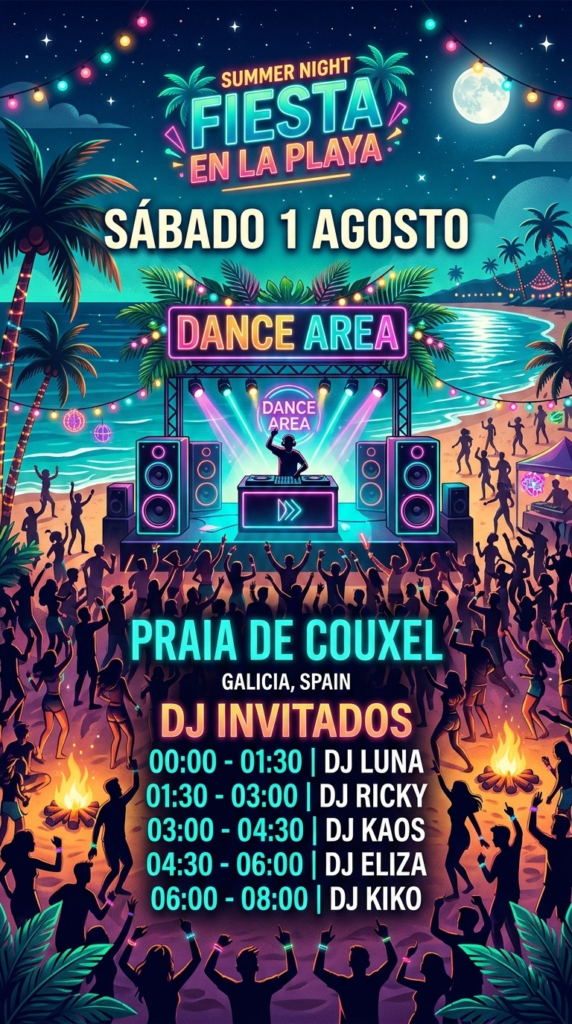
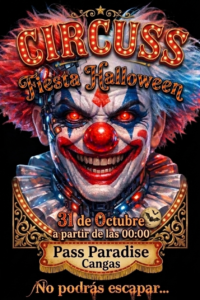

Publicidad digital: Cartel promocional del evento Salón del Cómic
La composición presenta una estética vibrante y narrativa, con predominio de tonos saturados y contrastes marcados que evocan el universo gráfico del cómic. El cartel combina elementos visuales propios de la cultura pop, la ilustración secuencial y el lenguaje visual de la historieta.
Producción técnica:
Software:
Adobe Photoshop con herramientas de IA generativa para la creación de personajes, viñetas y ambientación urbana.
Generación y composición:
Imagen generada mediante prompts y ajustes de IA, posteriormente refinada con técnicas de retoque digital. Se integran figuras inspiradas en superhéroes, ciencia ficción y fantasía, en una escena dinámica con efectos de luz intensa, contornos definidos y paleta cromática basada en rojos, azules, negros y tonos neón. La composición busca simular una portada de cómic, con tipografía impactante y estructura visual en capas.
Publicidad digital: Travesía a remo en fusión ilustración–fotografía
Cartel promocional creado para una travesía a remo, construido a partir de una imagen híbrida que combina fotografía real y elementos ilustrados. La escena muestra una playa luminosa como punto de partida y varias personas remando en primer plano, integradas mediante técnicas de dibujo digital y retoque fotográfico.
Producción técnica:
Software:
Adobe Photoshop con IA generativa para la creación y ampliación de elementos visuales; Adobe InDesign para la maquetación final del cartel; Photoshop para el retoque, integración y acabado general.
Generación y composición:
La base del cartel parte de una fotografía de playa, sobre la que se integran figuras remando generadas y refinadas con IA generativa de Photoshop. Se combinan capas fotográficas con trazos ilustrados, contornos suavizados y texturas añadidas manualmente para lograr una estética mixta entre realismo y dibujo digital. La composición se equilibra mediante ajustes de luz, color y perspectiva para reforzar la sensación de profundidad y dirección del movimiento.
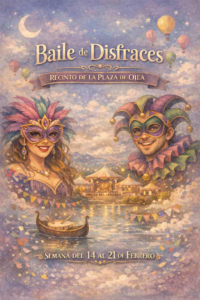
Publicidad digital: Cartel de baile de disfraces
La composición presenta una estética luminosa y festiva, con predominio de tonos claros y suaves que transmiten ligereza y ambiente celebratorio. El cartel combina elementos visuales propios de una fiesta temática de cuento.
Producción técnica:
Software
Adobe Photoshop con herramientas de IA generativa para la creación de personajes, ambientación y elementos decorativos.
Generación y composición:
Imagen generada mediante prompts y ajustes de IA, posteriormente refinada con técnicas de retoque digital. Se integran figuras disfrazadas en una escena clara y luminosa, con efectos de luz suave, brillos difusos y armonía cromática basada en blancos, beige, pastel y tonos cálidos.
Imagen digital superrealista creada mediante IA generativa de Photoshop, donde se combina estética futurista con elementos simbólicos. El conjunto funciona como un cartel conceptual para una convocatoria de arte digital, integrando tipografía y efectos visuales que potencian su carácter promocional.
Software:
Adobe Photoshop con herramientas de IA generativa (Generative Fill / Generative Expand) para la creación, ampliación y refinamiento de la escena.
InDesign: Textos.
Generación y composición:
Montaje híbrido que combina elementos generados por IA con retoques manuales. La figura femenina y el vehículo se integran en un entorno futurista mediante ajustes de iluminación, sombras coherentes y corrección de color avanzada.
La infografía se construye a partir de una estructura clara y ordenada, donde cada bloque temático encuentra su espacio dentro de una retícula pensada para que la información respire y se lea con naturalidad. Los iconos y la ilustración central aportan cercanía y ayudan a guiar la mirada, manteniendo un estilo sencillo y amable que hace que el contenido resulte accesible. El conjunto busca transmitir calma y claridad, reflejando la idea de “limpiar” y organizar la vida digital de forma visualmente coherente.
Técnicas empleadas:
Adobe InDesign — organización de la retícula, distribución de los cinco apartados, jerarquía tipográfica y composición final de la pieza.
Adobe Photoshop — creación y ajuste de iconos e ilustraciones, armonización de la paleta de color y preparación de los elementos gráficos para su integración en la maquetación.
Motion graphics — animación de los bloques informativos, movimiento suave de iconos y textos y construcción de una versión audiovisual que mantiene el tono y la estética de la infografía original.
Banner publicitario digital: integración de fotografía e ilustración vectorial
La fotografía ha sido tratada para potenciar la atmósfera de calma mediante ajustes de color, filtros de iluminación y correcciones de contraste, logrando una estética limpia y equilibrada.
Sobre la imagen se superpone una ilustración vectorial minimalista de una figura en postura de yoga, creada con líneas finas y curvas fluidas que aportan un estilo elegante y contemporáneo. Este elemento vectorial se integra sin perder nitidez, manteniendo la estética propia del diseño escalable.
Técnicas empleadas
La figura central parte de un círculo trabajado con volumen y efecto tridimensional, construido mediante herramientas vectoriales que permiten definir luces, sombras y profundidad sin perder la limpieza del trazo. Sobre esta base geométrica se integran ojos y manos estilizadas, añadiendo rasgos antropomórficos que aportan expresividad y carácter a la composición. El conjunto mantiene una estética clara y sintética, pensada para funcionar como elemento gráfico versátil en distintos contextos visuales.
Técnicas empleadas:
Prototipo creado para su inclusión en folletos y recursos educativos de primaria, con un enfoque visual pensado para facilitar la comprensión y reforzar el mensaje pedagógico. La ilustración está diseñada íntegramente en CorelDRAW, utilizando un lenguaje gráfico sencillo pero expresivo, adecuado para público infantil.
La escena representa una situación cotidiana cargada de simbolismo visual, donde cada elemento está construido mediante trazados vectoriales precisos, contornos limpios y una paleta cromática equilibrada. Se aplican transparencias, superposiciones y variaciones de grosor para aportar profundidad y dinamismo sin perder la estética característica del estilo de viñeta.
El resultado es una pieza clara, adaptable y fácilmente escalable, preparada para su uso en soportes impresos y digitales, manteniendo siempre la nitidez y coherencia visual propias del diseño vectorial.
Pieza gráfica creada para transmitir la relación entre el movimiento del cuerpo y la estética del arte visual. El diseño combina fotografía y composición digital para resaltar dinamismo, fluidez y expresividad.
Producción técnica:
Enfoque visual:
Uso de tonos y formas que acompañan la gestualidad del cuerpo, creando un cartel equilibrado entre lo artístico y lo publicitario, pensado para impresión de alta calidad.
Publicidad digital: Fusión de tecnología y naturaleza
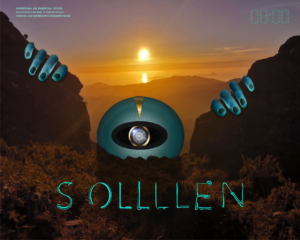
Imagen conceptual que representa la integración entre lo natural y lo artificial. Se compone de un paisaje montañoso al atardecer intervenido con elementos futuristas: un ojo robótico central y manos segmentadas emergiendo del terreno, que evocan una presencia extraterrestre.
Producción técnica:
Aplicación: Pieza pensada para campañas digitales o eventos temáticos, con fuerte carga conceptual y estética sci-fi.